3.8-rc3有几个我之前就很想要实现的特性:
需要基于3.8-rc3修改一下源码,把patch冲突解一下。
进入copy-mode时,行号会把原内容往后顶,我不太喜欢这个特性,我希望相对行号浮动在内容上面,有一个开关用来控制行号显示。该功能主要通过window_copy_line_number_width获取行号位宽,再对现有其他界面进行调整(如选区、高亮等),将调用点打桩为0就ok了。
3.8为了搭配新特性floating pane,默认开启了鼠标适配,当然要把它关掉,谁用tmux握个鼠标啊。
floating pane目前还是实验特性,可能不太稳定。我的popup pane主要用于在tmux里借vim的输入法键入中文。这个floating pane我打算用于移动focus pane到其他window去。
设想是这样的:
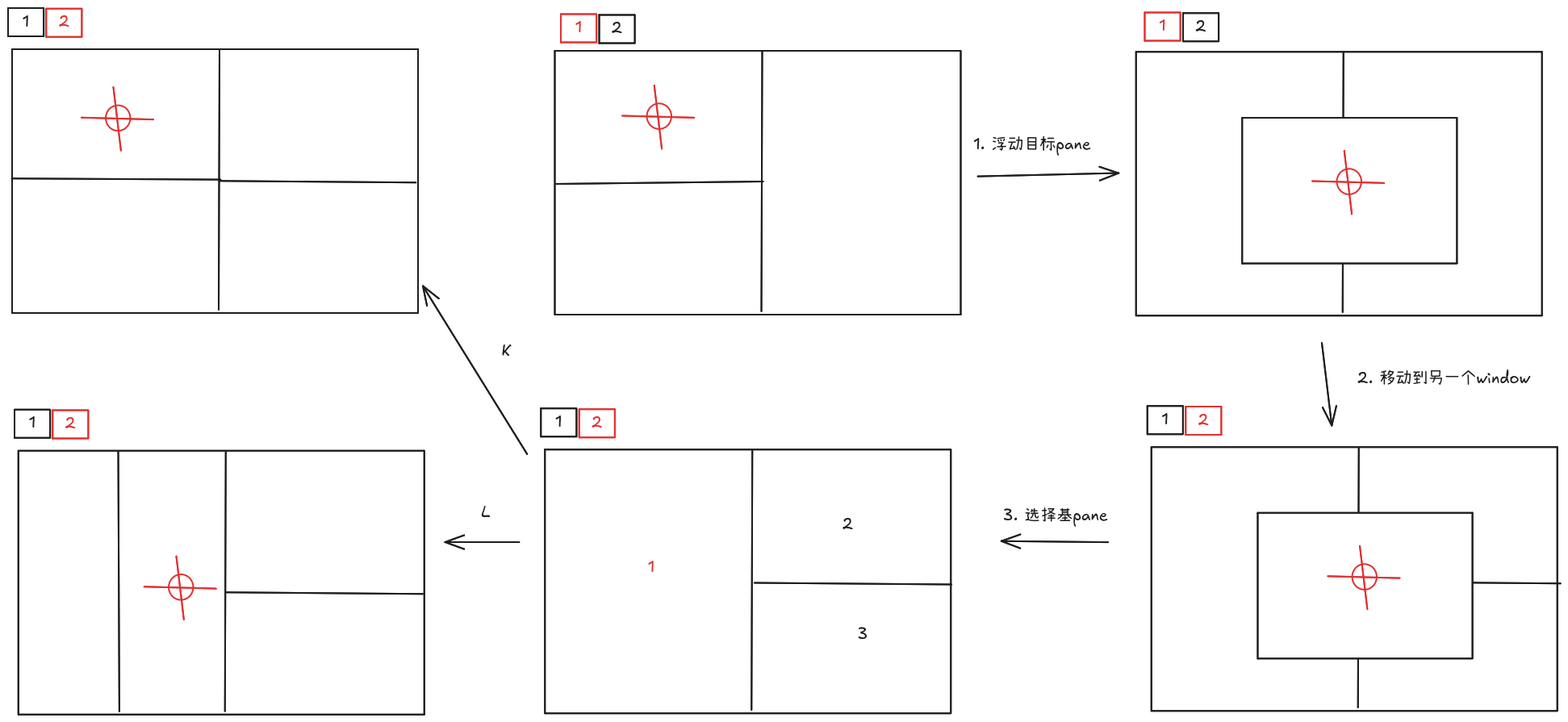
但我不太确定这个要怎么实现,是要改源码呢,还是单纯通过shell脚本实现。
通过快捷键<prefix>*,或者使用命令
tmux new-pane # 在屏幕上打开一个floating pane。
tmux join-pane # 把floating pane转为tiled pane
tmux break-pane -W # 把tiled pane转为floating pane
第一步,直接使用break-pane -W即可。
第二步,根据输入向前或者向后移动,使用new-pane创建一个临时floating pane,swap-pane -t <原pane_id>,再kill-pane -t <新pane_id>即可。
第三步及后续步骤不太好实现,因为display-pane在3.8被改成了mode,达到定制要求需要新增一种类似的mode,hide掉floating pane之后进入display-pane,再读取用户的一次输入来决定最终摆放位置。没有充足的理由为这一个小场景大改源码。
3.8的部分模块重写可能引入了什么bug,我发现了两个问题
display pane是没问题的bind b run-shell 'tmux set-environment PANE_ID #{pane_id}' \; display-panes -d 0 \; run-shell 'tmux swap-pane -t #{PANE_ID}'
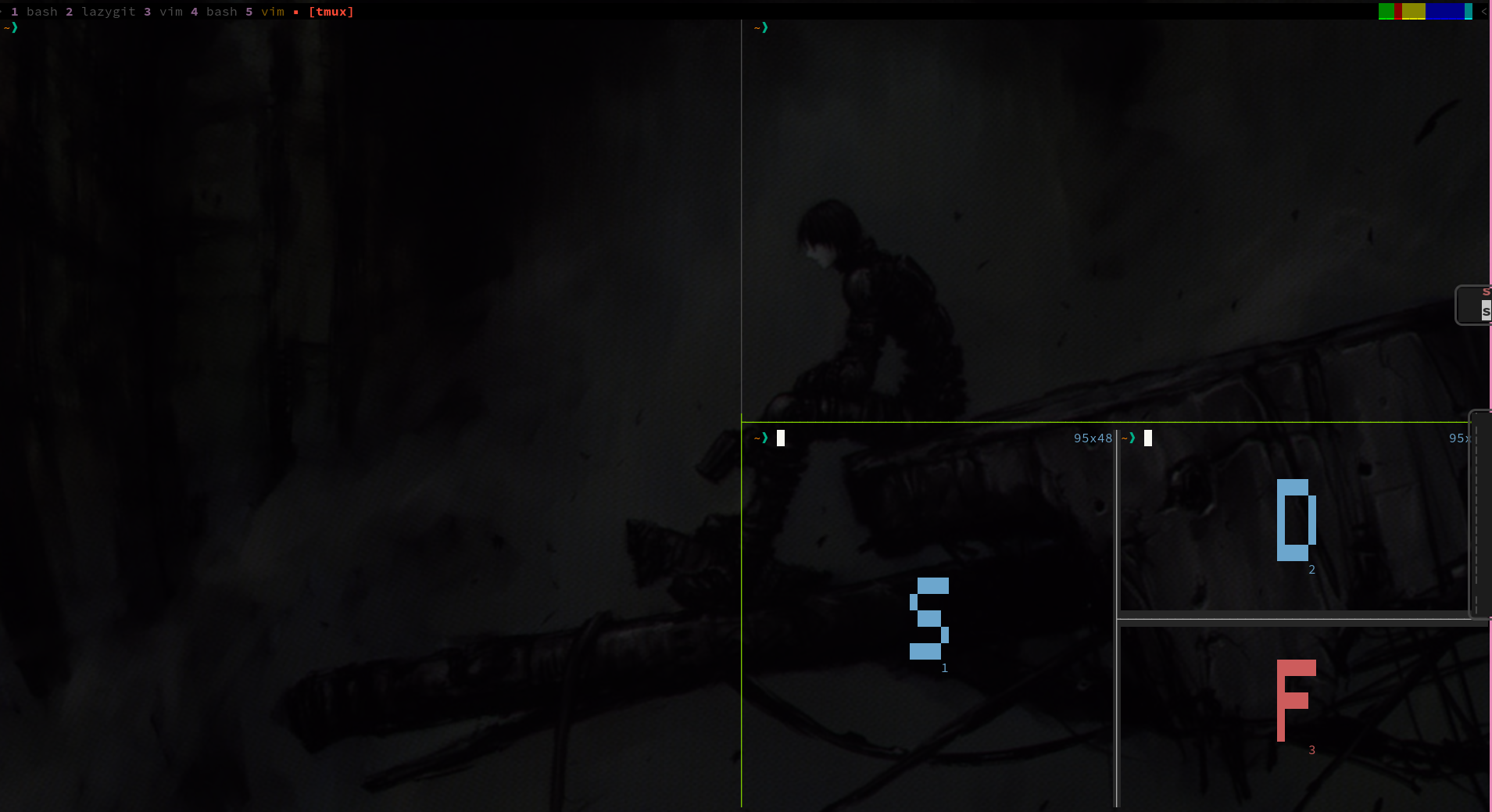
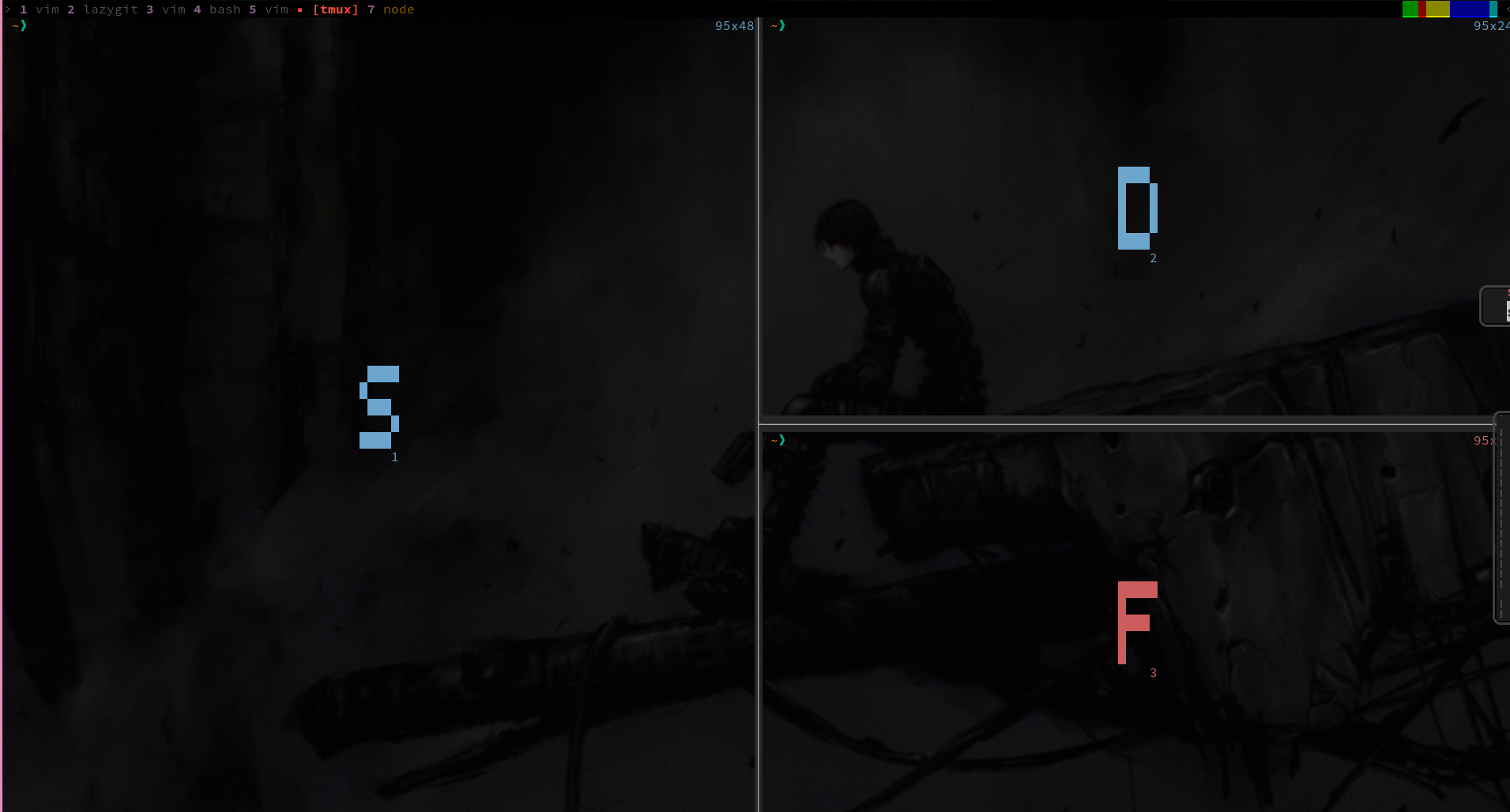
不过先不管这个BUG了吧,因为我发现display-pane可以通过参数传入一个shell脚本参数,tmux会负责把参数中的字符%%替换为选中pane的id,默认行为是select-pane -t %%,也就是会跳过去,所以这个问题可以很优雅地解决。
bind b display-panes -d 0 'swap-pane -t %% -d'
经过一翻调试,主要问题是tmux display-panes改成了mode,也就是与用户的交互是异步,不是原来的同步模式,举一个简单的例子,
tmux display-panes && st
在3.7,这个命令需要等到用户按下按键选择后才会执行st。3.8,在用户按下按键之前,st就会被执行。也就是说,外部不知道用户会在什么时候按下key,也不知道什么时候按下esc,忙等是不合理的。
有两个解决方案,
想魔改就得先了解mode的运行原理,3.8把很多东西抽象进了choose-tree里,有点像状态机
    if (cmd_get_entry(self) == &cmd_choose_buffer_entry) {
        if (paste_is_empty())
            return (CMD_RETURN_NORMAL);
        mode = &window_buffer_mode;
    } else if (cmd_get_entry(self) == &cmd_choose_client_entry) {
        if (server_client_how_many() == 0)
            return (CMD_RETURN_NORMAL);
        mode = &window_client_mode;
    } else if (cmd_get_entry(self) == &cmd_customize_mode_entry)
        mode = &window_customize_mode;
    else if (cmd_get_entry(self) == &cmd_switch_mode_entry)
        mode = &window_switch_mode;
    else if (cmd_get_entry(self) == &cmd_display_panes_entry)
        mode = &window_panes_mode;
    else
        mode = &window_tree_mode;

    window_pane_set_mode(wp, NULL, mode, item, target, args);
    return (CMD_RETURN_NORMAL);
现在有很多mode
评估了下,不是很看的懂。最终还是选择异步,改改sd,把最终发送按键的逻辑放到display-pane的回调里了。
bash引号问题是真恶心,最终采用了文件作为媒介传输stdin。
config changes
set -g display-panes-order "sdflkjgh"

# 不知道为什么,当前pane默认多了个下划线。不喜欢,去掉
set -g window-status-current-format "#[fg=color9, bold, nounderscore]▪ #W "

set -g copy-mode-line-numbers relative
set -g copy-mode-line-number-style fg=color101

bind -T copy-mode-vi z if-shell \
    'tmux show-options -qv copy-mode-line-number-trigger | grep -q "^off$"' \
    'set copy-mode-line-number-trigger on' \
    'set copy-mode-line-number-trigger off'

bind g switch-client -T GEM \; break-pane -W -x 50% -y 50% -X 25% -Y 25%
bind -T GEM M-\; run-shell 'tmux_gem left #{pane_id}' \; switch-client -T GEM
bind -T GEM M-\' run-shell 'tmux_gem right #{pane_id}' \; switch-client -T GEM
bind -T GEM g join-pane
tmux_gem
#!/bin/bash

if [[ "$2" != "" ]]; then
    current=$2
else
    current=$TMUX_PANE
fi

if [[ "$1" == "left" ]]; then
    tmux prev
elif [[ "$1" == "right" ]]; then
    tmux next
else
    exit 1
fi

new=$(tmux new-pane -x 50% -y 50% -X 25% -Y 25% -P -F '#{pane_id}')

tmux swap-pane -t $current
tmux kill-pane -t $new
sd
#!/bin/bash

if [[ "$1" != "-t" ]]; then
    read -r content
    echo "$content" > /tmp/sdcmd
    tmux display-panes -d 0 "run-shell \"$0 -t %% $@\""
    exit 0
fi

while [ "$#" -gt 0 ]; do
    case "$1" in
        -t)
            shift
            target=$1
            shift
            ;;
        -N)
            went=1
            shift
            ;;
        *)
            echo "unknown arg: $1"
            shift
            ;;
    esac
done

if [[ "$TMUX_PANE" == "$target" ]]; then
    exit 1
fi
if [[ "$went" == "1" ]]; then
    tmux select-pane -t $target
fi

in=$(cat /tmp/sdcmd)
(sleep 0.1 && eval "tmux send -t $target $in" &)