很多开发者喜欢用github,在线的git平台我也只用过这个,不过不该把它当作git云端仓库的唯一选项。站在个人使用的角度上,我只是把github当作一个存储配置的地方,另外用来研究别人的代码的实现方式,关注一下工具的社区有没有我遇到过的同款issue及解决方式。很多人喜欢用private仓,但这真的是private吗?我不好说。另外,作为一个精神末日准备者,为准备闭关的那一天,应该自己搭一个git服务器。
关于搭建git服务器,官方提供的指导手册有详细的说明。考虑使用其中的ssh协议(开发者)和git协议(任意设备)。
需要创建一个用于管理仓库的git用户,后续的远程仓库基于该用户操作,开发者需要把登录凭证登记到该用户的authorized_keys。这就意味着开发者可以直接ssh到这台服务器的git用户环境上,需要对git用户的操作进行管控,因此git提供了git-shell用于替换高自由度的普通终端工具,限制用户只能使用git-shell-commands下的命令。做到这点只需要让git用户的终端改为git-shell就行了。
上面管控了用户的行为,但没有对权限进行分层,git本身不包含用于根据公钥区分用户的机制。事实上,在仓库操作期间,只有git一个真正的用户。这一点需要借助sshd的帮助。authorized_keys有一个参数,可以让特定用户在登录时执行指定的命令。
       command="command"
               Specifies  that  the  command  is executed whenever this key is
               used for authentication.  The command supplied by the user  (if
               any) is ignored.  The command is run on a pty if the client re‐
               quests  a  pty; otherwise it is run without a tty.  If an 8-bit
               clean channel is required, one must not request a pty or should
               specify no-pty.  A quote may be  included  in  the  command  by
               quoting it with a backslash.

               This  option might be useful to restrict certain public keys to
               perform just a specific operation.  An example might be  a  key
               that  permits  remote  backups but nothing else.  Note that the
               client may specify TCP and/or X11 forwarding  unless  they  are
               explicitly prohibited, e.g. using the restrict key option.

               The  command  originally supplied by the client is available in
               the SSH_ORIGINAL_COMMAND environment variable.  Note that  this
               option  applies to shell, command or subsystem execution.  Also
               note that this command may be superseded by  an  sshd_config(5)
               ForceCommand directive.

               If a command is specified and a forced-command is embedded in a
               certificate  used for authentication, then the certificate will
               be accepted only if the two commands are identical.
当然这个命令是在git用户的shell上执行的,即git-shell,所以需要在git-shell-commands目录下创建对应的脚本才行。
接下来就是分权了。
管理员A可以拿到git的shell,进行任意操作。这个不需要特别的实现,直接用linux的用户权限就能做到。D并不会作为linux用户创建在服务器上,D用户的概念只存在于git_shell的环境变量里。
| 角色 | 说明 | 权限 |
|---|---|---|
| A | admin | S MG G |
| D | develop | G |
S: shell
MG: modify git
G: git
每个开发者都能创建仓库,创建完之后,创建者为C,其他用户是V,C可以授权push权限给信任的V用户,他们会成为仓库的P,也能push。但只有C能push -f。
| 角色 | 说明 | 权限 |
|---|---|---|
| C | create | MP P V |
| P | push | P V |
| V | visit | V |
MP: modify push
P: push
V: visit
需要确定如何限制用户行为。我在校验脚本里记录了git与服务器交互时,变量$SSH_ORIGINAL_COMMAND的值:
clone: git-upload-pack '/repo/test'pull: git-upload-pack '/repo/test'push: git-receive-pack '/repo/test'push -f: git-receive-pack '/repo/test'所以无法单纯通过$SSH_ORIGINAL_COMMAND命令来判断当前用户使用push还是push -f,我们需要借助git-hooks。hook分为客户端与服务端。
oldrev1 newrev1 refname1 ... oldrevN newrevN refnameN,多次推送,一次校验,拦截所有oldrev newrev refname,多次推送,多次校验,只拦截失败pre-receive和update都能用,区别大概可以概括为“前者为原子操作”,我倾向前者。
再考虑二进制文件的存储。git文档有单独的专题介绍,可以通过.gitattributes配置匹配规则,匹配上之后git不再会用常规的对比工具来对比这个二进制文件。git存储二进制文件的真正问题是,每个状态的文件都会存储在git的blob中,这就意味着,git clone仓库时,就算当前的节点不需要用到某个二进制文件,也必须下载到本地,后续可能会替换二进制文件,这就导致了仓库体积变得很大。
我们每次 git add 一个文件,哪怕只修改了一个字,由于计算出来的 SHA-1 的值不同,git 都会为它新建一个 blob 对象,而不是去记录文件的前后变化差异。 --git 学习笔记 5。
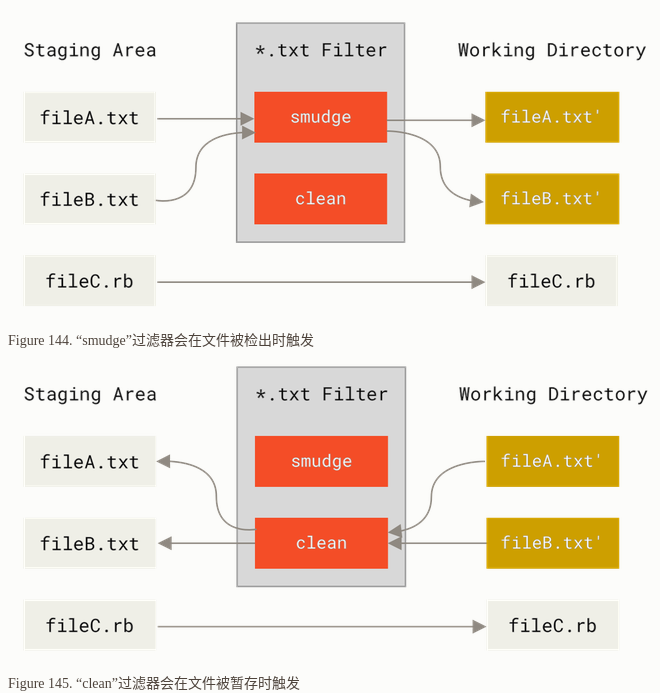
对于二进制的存储,主流的解决方案有git-lfs,在仓库侧只存储特征值,将文件本身放到其他存储空间中,需要使用时再从存储空间下载到本地。git-lfs是基于git自定义拓展里的关键字展开实现的。考虑用scp实现一个简易版的git-lfs。
clean很好实现,用sha256sum计算文件摘要,同时把文件缓存到缓存目录,不然checkout几次后原始内容就会消失。smudge负责文件下载,检测本地是否有目标缓存文件,没有的话就从远端仓库下载。另外需要在pre-push的hook脚本里进行上传,先从远端拉一份存量的文件列表,再从缓存里对比哪些文件需要上传。
虽然scp是在本地执行的,但查了资料,它实际做的事是ssh到目标服务器上,再执行scp -t/scp -f。我们无法直接在受限的git-shell上执行未规定的命令(包括scp)。
scp -t <{path}>指定要接收目标文件存放的地址scp -f <{path}>指定要传输的目标文件所以还需要wrap一下scp,我们的文件会存放到对应的仓库目录下,而不是统一一个大目录管理。
新版本的scp不是上面一个机制,它会使用sftp协议,wrap了scp也行不通。如果要维持该行为,需要加一个参数
-O,scp -O ./zz git@server:/tmp/
     -O      Use  the  legacy  SCP  protocol for file transfers instead of the
             SFTP protocol.  Forcing the use of the SCP protocol may be neces‐
             sary for servers that do not implement SFTP,  for  backwards-com‐
             patibility  for particular filename wildcard patterns and for ex‐
             panding paths with a ‘~’ prefix for older SFTP servers.
开放且快速的git协议。白名单机制,要在bare仓库里添加一个空白文件git-daemon-export-ok,才可通过git协议下载。
开放9418端口,跑一个deamon就能用了:
git daemon
注意一下clone写法:
git://<server>[:<port>]/path/to/repos.git/
1. basicole.tar.gz
部署一个git服务器需要的最小系统。解压到某用户的home目录下。修改/etc/passwd中对应用户的shell为git-shell。
增加git人员需要在.ssh/authorized_keys增加:
command="auth <{name}>" <{pubkey}>
cd /path/to/repo/needs/to/install/lfs
/path/to/stone/install.sh

echo "*.<{target format}> filter=stone" >> ./gitattributes
注意,目前只会将
origin作为scp的对象。
别在工具上放太多注意力。